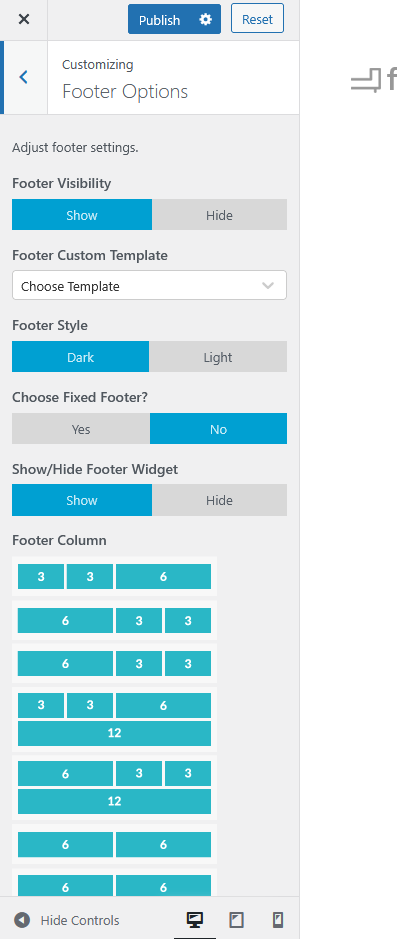
The Footer Options section lets you manage the layout, style, and visibility of your website’s footer. You can choose from multiple layout configurations, customize the footer style, and add or remove footer elements based on your preference.
To access:
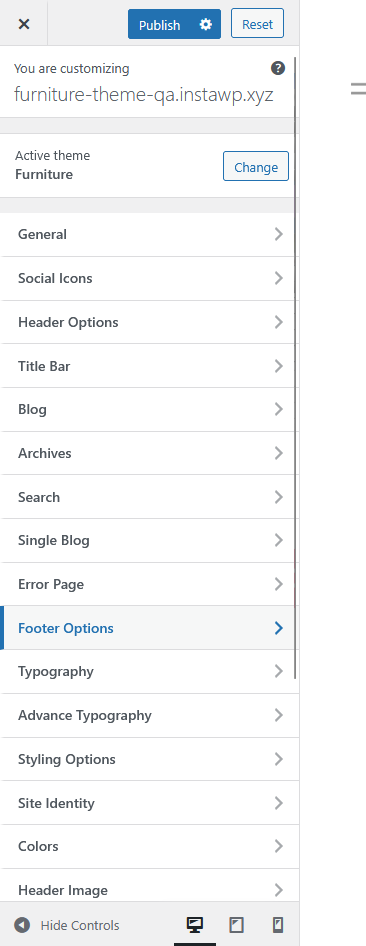
Go to Appearance > Customize > Footer Options
Footer Visibility
Toggle the footer on or off across the entire site by selecting Show or Hide.
Footer Custom Template
Use this dropdown to choose a pre-made footer layout template if available.
Footer Style
Select between Dark or Light footer themes to match your site’s overall design.
Fixed Footer
Enable or disable a fixed footer that stays visible while scrolling by selecting Yes or No.
Footer Widget
Control the display of footer widgets by toggling Show or Hide.
Footer Column Layout
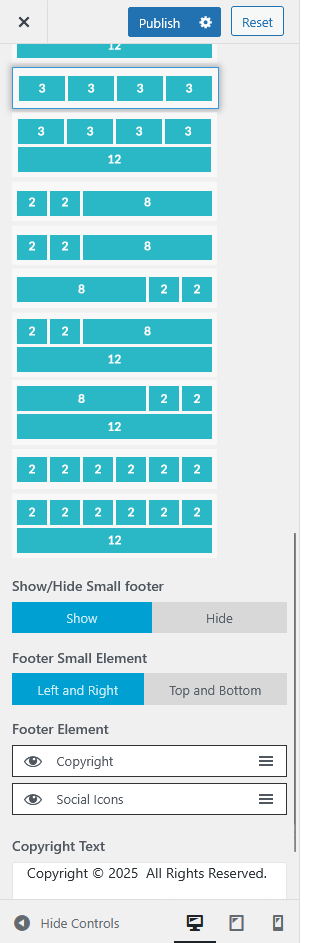
Choose your desired column structure from various predefined grid layouts (e.g., 3-3-6, 6-3-3, 12, etc.) to organize footer widgets effectively.
Small Footer
Toggle the small footer visibility using Show or Hide.
You can also adjust the small footer’s element alignment to either Left and Right or Top and Bottom.
Footer Elements
Select which items appear in the small footer, such as Copyright and Social Icons.
Copyright Text
Customize the text displayed at the bottom of the footer, such as your copyright notice or other legal information.